
Costs are estimates: set Your costs
Every dollar on screen is worked out from the costs you enter. Here is where they live and what each one means.
Where they live
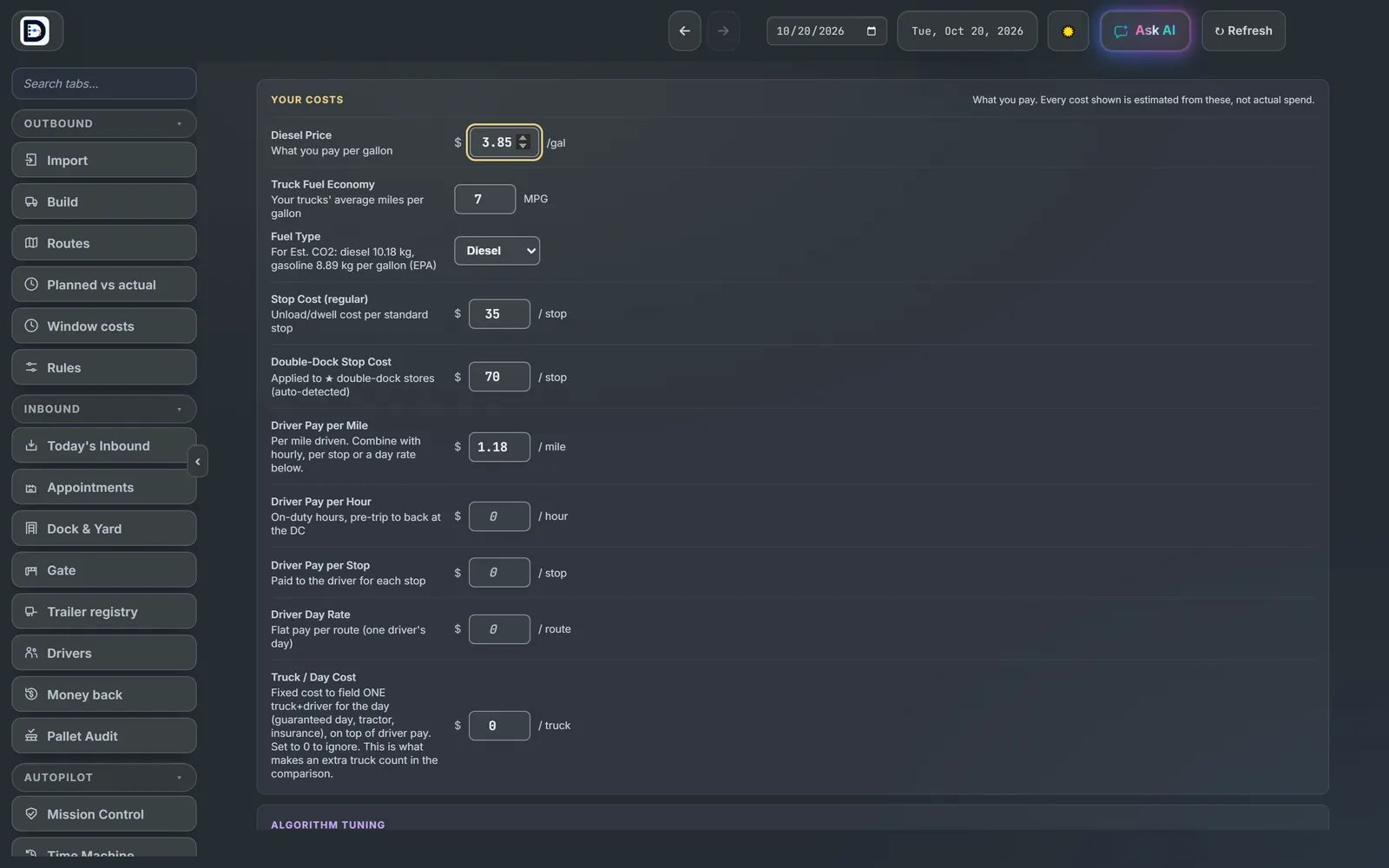
Open Optimizer Settings (under Settings, Optimizer) and scroll to Your costs.
What each one is
- Diesel Price: blank uses the market price. A price you type is never replaced.
- Truck Fuel Economy: 7 miles per gallon to start. Fuel Type is used for the CO2 estimate.
- Stop Cost: $35 a stop, and Double-Dock Stop Cost $70.
- Driver Pay per Mile: $1.18 to start. Add per hour, per stop or a day rate if that is how you pay. They add together.
- Truck / Day Cost: a fixed cost for each truck you send. 0 ignores it.
A blank box uses the starting value. A typed 0 means 0.
Why it says Est.
The app does not see your fuel cards or payroll. So every cost is labeled: Est. plan cost, Est. cost / pallet, and each load's line starts with est. The caption under the numbers says they are estimated from your cost settings and are not actual spend.
Close enough is fine for picking between two plans. To make the numbers yours, put in your real pay rates and fuel economy, and close out each night with real miles.