
Planned vs actual
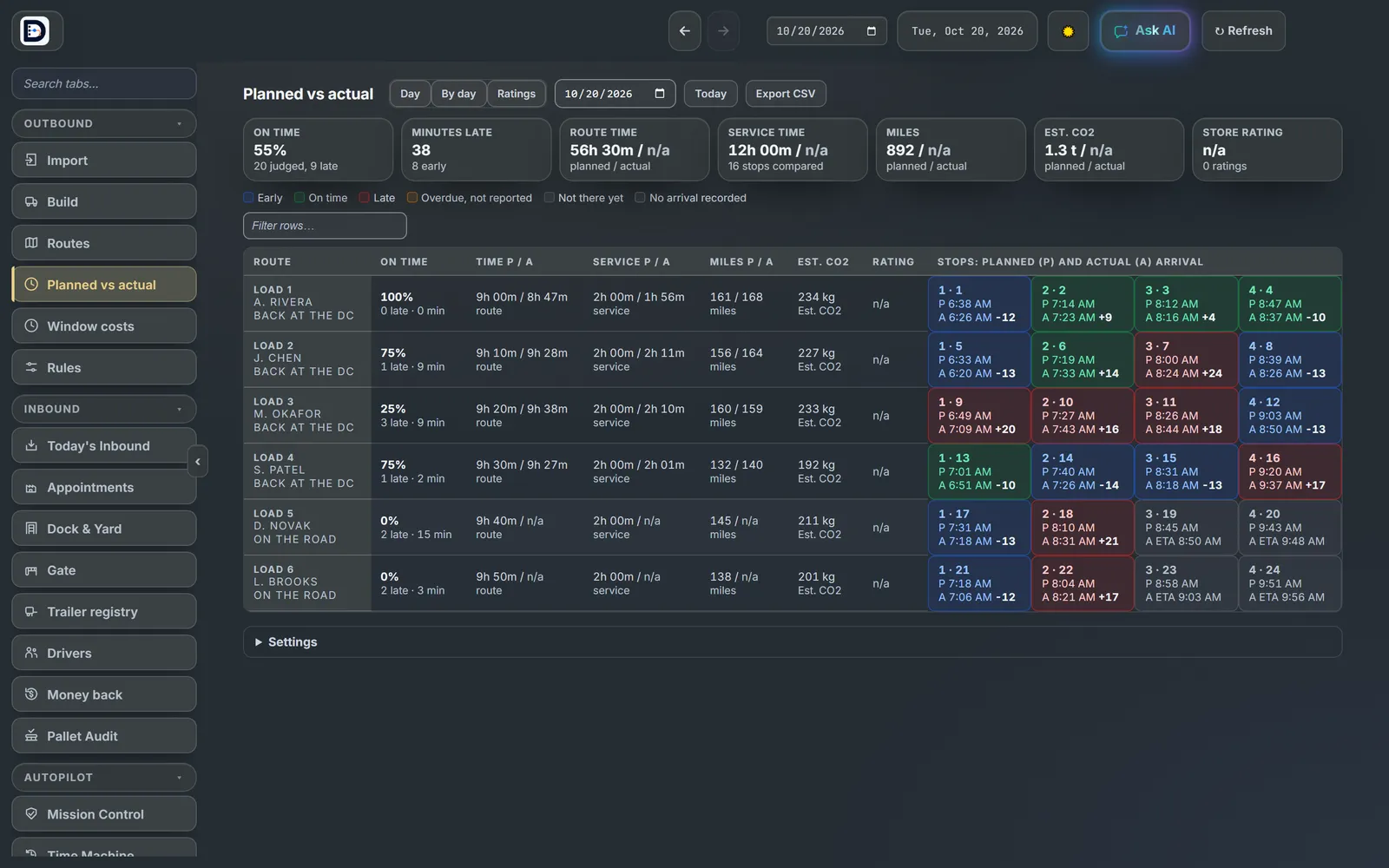
Each stop's planned arrival next to the real one, and each route's time and miles, planned and actual.
Open it
Open the Planned vs actual tab. It has three views: Day, By day and Ratings. Today's Day view reads again every 30 seconds.
Read the Day view
- The cards on top: on time, minutes late, route time, service time, miles and estimated CO2 for the day.
- One row per route with its own totals.
- One box per stop: P is the planned arrival, A the actual one from the driver's phone, and the number how many minutes early or late.
- The color says early, on time, late, overdue or not there yet.
Where the actuals come from
- Arrival and delivery times come from the driver app. A stop with no tap shows as no arrival recorded.
- Actual miles are the ones typed at close out.
On time, exactly
A stop with a delivery window is judged on its window. A stop without one is judged on its planned time and your On-time tolerance, 15 minutes either way to start. Change it under Settings on this tab.
Press Export CSV for a spreadsheet. With live tracking on (off by default, an admin turns it on), a map of the trucks shows above the table.